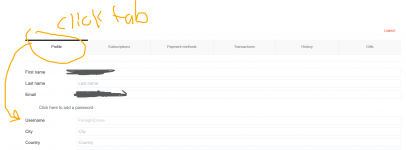
Had to do the same. But for some reason there is an @sign in front of my user that isn’t there on settings.I had to logout and then log back in, not sure if everyone has to do that. Just an fyi in case it can help a fellow Cat fan.
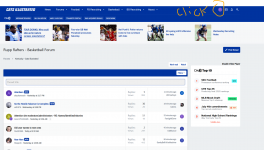
Screen shots from laptop/pc; or phone?STEP 1:
View attachment 834177
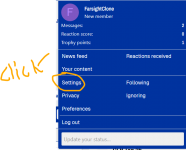
STEP 2:
View attachment 834180
STEP 3:
View attachment 834183
Then scroll down and Click Save Changes

View attachment 834185
Hope this helps!
Who’s this “new member”?! Such bullsh*t lolScreen shots from laptop/pc; or phone?
Yeah, delayed reaction. Takes a bit. But I’ll be damned if that @sign just won’t go away. Some ******** right there.It doesn’t change instantaneously but will change eventually
Same, my Anon brothers and I about to sail to wildcat nation. This some bull.In the settings it has my username. Saved changes multiple time. However, it seems they want me to be Anon
Mine is doing the same thing. I would like for it to go away as well.Just tried again. Logged out, back in.
I really want that @ to go away.
Hasn’t worked for me either. My username is correct in settings and I have saved changes and still I’m anon.Well
Don't @ me brahJust tried again. Logged out, back in.
I really want that @ to go away.
KSR
A healthy Brooklyn DeLeye is locked in for her senior season
KSR
Mark Mitchell is officially in the transfer portal -- with a Do Not Contact tag
KSR
Kentucky Could Add an NFL Running Back to the Roster
KSR
10 things to know as Kentucky Volleyball begins the 2026 season
KSR
Mark Mitchell's temporary restraining order in Kentucky has been GRANTED