Mine displays at 90 degrees from the original and doesn't fill the frame. Can this be corrected or do I have to choose another photo?This worked for me.
Open your profile, you'll see where you avatar goes (now a letter) in the upper left. Hover the mouse over that spot and you should see the word "Edit" show up.
Here's a shot:
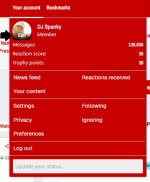
View attachment 832980
Select that button and it will allow you to upload an avatar photo.
Mine displays at 90 degrees from the original and doesn't fill the frame. Can this be corrected or do I have to choose another photo?
Thanks for the assistance!!!This worked for me.
Open your profile, you'll see where you avatar goes (now a letter) in the upper left. Hover the mouse over that spot and you should see the word "Edit" show up.
Here's a shot:
View attachment 832980
Select that button and it will allow you to upload an avatar photo.
@DJ Spanky any idea how to add a signature back in?
The Knight Report
From FCS to the Big Ten, Bradlee Jones is betting his speed opens the door at Rutgers
The Knight Report
Rutgers Football Fall Camp: Get 75% off The Knight Report - Final Day!
The Knight Report
2028 Illinois EDGE Kristian Chadick adds Rutgers Football Offer
The Knight Report
WAR ROOM: Latest Recruit Scoop and Team News on Rutgers Athletics
The Knight Report
Chin, Walker named to Comeback Player of the Year Watch List