Mine displays at 90 degrees from the original and doesn't fill the frame. Can this be corrected or do I have to choose another photo?This worked for me.
Open your profile, you'll see where you avatar goes (now a letter) in the upper left. Hover the mouse over that spot and you should see the word "Edit" show up.
Here's a shot:
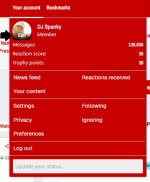
View attachment 832980
Select that button and it will allow you to upload an avatar photo.
Mine displays at 90 degrees from the original and doesn't fill the frame. Can this be corrected or do I have to choose another photo?
Thanks for the assistance!!!This worked for me.
Open your profile, you'll see where you avatar goes (now a letter) in the upper left. Hover the mouse over that spot and you should see the word "Edit" show up.
Here's a shot:
View attachment 832980
Select that button and it will allow you to upload an avatar photo.
@DJ Spanky any idea how to add a signature back in?
The Knight Report
Rutgers' new defensive end took lessons from the Super Bowl champs - and his favorite team
The Knight Report
Rutgers Football Fall Camp is Rolling: Get 75% off The Knight Report now - JUST 2 Days Left
The Knight Report
Four Rutgers Football commit candidates in the 2028 class
The Knight Report
Projecting the 2026 paths for all 25 Rutgers freshmen and how the new 5-for-5 rule factors in
Women's Sports
Top 2027 recruit Ashley MacCalla updates recruitment