An update on the follow feature

altmin

All-Conference
Moderator
Jun 16, 2025
1,570
2,880
113
We have seen the many posts about the following feature not setting off alerts when those that you follow post. We have learned that the feature functions differently on this board software. Over here, when you follow someone, their posts get collected into something called your news feed. On desktop, you click your user profile in the upper right and then click on news feed, and you will see the page of your followed people's posts.
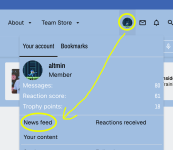
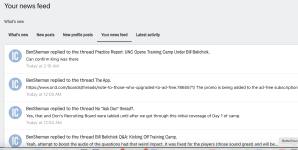

Screenshot 2025-08-03 at 8.23.11 AM.png Screenshot 2025-08-03 at 8.28.25 AM.png


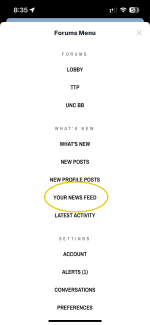
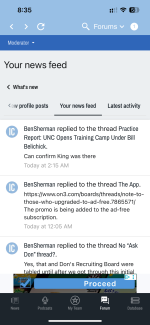
On the App, click the dropdown arrow in the upper right, then choose news feed.
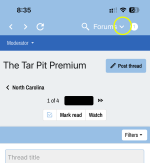

IMG_0157.PNG


IMG_0158.PNG


IMG_0159.PNG

I know this is a bit different to what everyone is used to, but we are looking for a way to have it function like the old system. I'd like to thank the poster snooprob for finding the breakthrough on this issue.
 
Last edited:

mgress

Redshirt
Jul 25, 2025
17
2
3
I can switch forums from this menu, but nothing else works. Clicking anything in whats new or settings does nothing and sometimes even crashes the app. Uninstalled and reinstalled, same thing. UPDATE: The settings in the forums menu are now working. Just the Whats new section, not working.
 

altmin

All-Conference
Moderator
Jun 16, 2025
1,570
2,880
113
You don’t see that on an iPhone. Still can’t see where someone I follow posted.
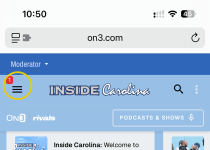
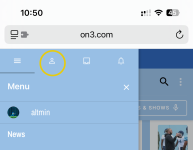
On an iphone without using the app, it is slightly different. You have to click on the three lines in the upper left, then the person icon, news feed. You can bookmark the end page, or keep it open as its own tab.

IMG_0160.PNG

IMG_0161.PNG

IMG_0162.PNG

IMG_0163.PNG
 

altmin

All-Conference
Moderator
Jun 16, 2025
1,570
2,880
113
I can switch forums from this menu, but nothing else works. Clicking anything in whats new or settings does nothing and sometimes even crashes the app. Uninstalled and reinstalled, same thing. UPDATE: The settings in the forums menu are now working. Just the Whats new section, not working.
I will play around and attempt to replicate this. I apologize for the difficulties.
 

CarolinaFlagHunter

All-American
Jun 30, 2025
3,472
5,628
113
On an iphone without using the app, it is slightly different. You have to click on the three lines in the upper left, then the person icon, news feed. You can bookmark the end page, or keep it open as its own tab.

View attachment 864807

View attachment 864808

View attachment 864809

View attachment 864810
That doesn’t work for me. That person icon is hidden at the top. I pull the screen down but it doesn’t stay so I can’t even click on that person icon. I used to be able to but not any longer.
 

altmin

All-Conference
Moderator
Jun 16, 2025
1,570
2,880
113
That doesn’t work for me. That person icon is hidden at the top. I pull the screen down but it doesn’t stay so I can’t even click on that person icon. I used to be able to but not any longer.
Hmmm. I will check it out. Standby please.
 

altmin

All-Conference
Moderator
Jun 16, 2025
1,570
2,880
113
I tried again this morning. I can pull the page down to see those 3 icons but I can’t click on them because as soon as I let go they go back up and hide.
I have been unable to replicate on my iphone, and on my wife's older iphone. I have tried in Safari and Chrome. I was hoping to get my hands on an Android to test with, but it didn't work out.

What kind of phone are you experiencing this on?